

Relay-Key Online Guide
 |
 |
|
 |
|
 |
|
 |
|
Transferring measurement data
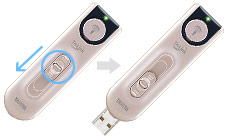 |
1. Extending the USB connectorSlide the sliding section to the end while pressing the lock release button. |
|---|
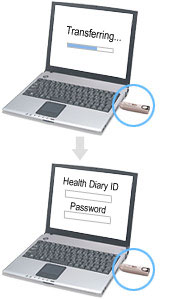 |
2. Inserting it in the PC's USB portThe measurement data is read and the member's page logon screen is activated. Check the confirmation LED.Confirm the confirmation LED before inserting the Relay-Key into the USB port. Note that, if it is lighted green, that means that infrared communication is on standby and insertion may cause a failure. When insertion in a USB port is not possibleThere are cases when it is not possible to insert it directly due to the shape of the PC's USB port. If so, please use the accessory extension USB cable. |
|---|
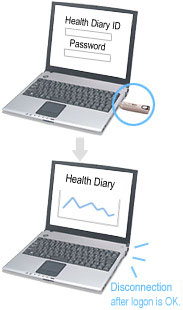 |
3. Logging onto the [Health Diary]When the Health Diary ID and password are entered and [Login] is pressed (clicked), measurement data transferred to the Health Diary is displayed in a graph. Timing for disconnection from the USB portDisconnection from the USB port is no problem as long as you have inserted the Relay-Key in the USB port and have logged onto the member's page. While logged onto the member's page, the authentication of the Relay-Key member ID and password, incorporation of measurement data, clock correction, etc., are carried out automatically. While inserted in the USB portDo not press the communication button while the Relay-Key is inserted in the USB port. It can be the cause of failure. |
|---|
Automatic functions while connected to the PC
Tasks other than transfer of measurement data may also be implemented automatically at the same time while connected to the PC.
Correcting the internal clock
While the Relay-Key is inserted in the USB port, the server (website) time is confirmed and the internal clock is automatically corrected. This is unrelated to the time setting of the PC. No problems will occur even if the PC time happens to be set inaccurately.
Detection of registration update information
Registration may be updated on the member's page. If there are changes in stature, sex or birth date, disparities with previously registered information are detected when the Relay-Key is connected to the PC and a confirmation dialog box is displayed. However, you should reconnect the Relay-Key if registration is changed with the Relay-Key connected.