

Relay-Key Online Guide
 |
 |
|
 |
|
 |
|
 |
|
Body Composition Monitor BC-580/BC-501 for storing measurement data
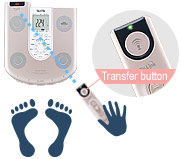 |
1. Automatic activationAim the Relay-Key communication section toward the Body Composition Monitor communication section and press the Relay-Key communication button. |
|---|
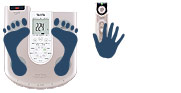 |
2. During measurementStand on the Body Composition Monitor while holding the Relay-Key. The weight of the Relay-Key itself is already deducted in the Monitor (automatic tare weight function). |
|---|
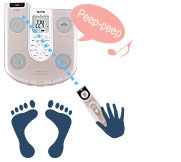 |
3. Receipt of measurement dataOnce the measurement is completed, step off of the Monitor and aim the Relay-Key communications section toward the Monitor's communication section. If you can hear a peeping sound from the Monitor, that means that the measurement data is being read properly into the Relay-Key. Of course, it is also possible to view the Relay-Key confirmation LED to comprehend the communication conditions. Based on communication performance and conditions, measurement data transfer or receipt may conclude before stepping off of the Monitor after completion of the measurement. However, that will not cause any change in the measurement data. |
|---|
Using multiple Relay-Keys
Confirm that there is no one else nearby who is using a Relay-Key while you yourself are making measurements with one.
Please be aware that, depending on the timing, measurement data may be received from other Relay-Keys.
If there are multiple body composition monitors
If there are multiple body composition Monitors placed next to one another and the timing is just right, they may be activated simultaneously when the communication button is pressed.
If this happens to be the case, you will probably want to avoid simultaneous activation by adjusting the distance or direction.