

Relay-Key Online Guide
 |
 |
|
 |
|
 |
|
 |
|
 |
||||||||||
 |
 |
 |
 |
 |
 |
|
 |
|
 |
 |
 |
||||||||||
(5) Registering member information in the Relay-Key
Execute this step immediately after executing the previous step (4) without any interruption.
Also be sure not to disconnect the Relay-Key while the task is in progress.
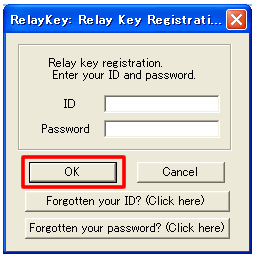
1. Entering ID and password
Enter your ID and password set at the time of member registration on the Relay-Key registration screen. Once entered, select OK and proceed on.
2. Confirming registration information
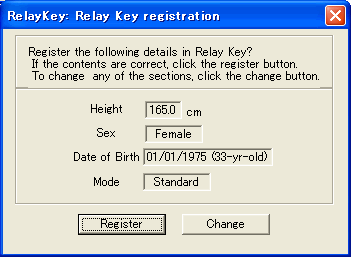
The information stored in the Relay-Key is displayed based on the content registered in the website.
If the content is correct, select [Register] and proceed on.
To revise the content, select [Revise] and revise the content.
3. Completing the registration
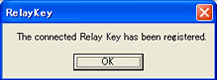
When the registered dialog box appears, press [OK] to shift to the member's page login screen.
The Health Diary screen opens when the ID and password are entered.
This completes the initial setting procedure. Disconnect the Relay-Key from the PC.
The Relay-Key can now be used.