

Relay-Key Online Guide
 |
 |
|
 |
|
 |
|
 |
|
 |
||||||||||
 |
 |
 |
 |
 |
 |
|
 |
|
 |
 |
 |
||||||||||
(4) Registering Relay-Key in the PC
Please complete this step (4) and the following step (5) in succession without interruption.
Also be sure not to disconnect Relay-Key while the task is in progress.
Note: The initial registration may not be necessary if you are using Windows 2000 (automatic registration). If so, please proceed to [(5) Registering member information in the Relay-Key].
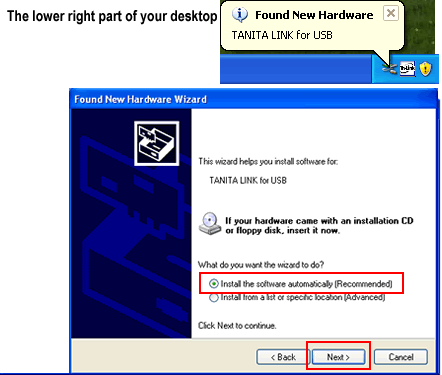
1. Hardware detection
Insert the Relay-Key in the PC's USB port.
The Search Wizard screen is activated after a comment appears in the lower right corner of the Desktop (it may not appear).
Check [Automatic install (recommended)] and select [Next (N)].
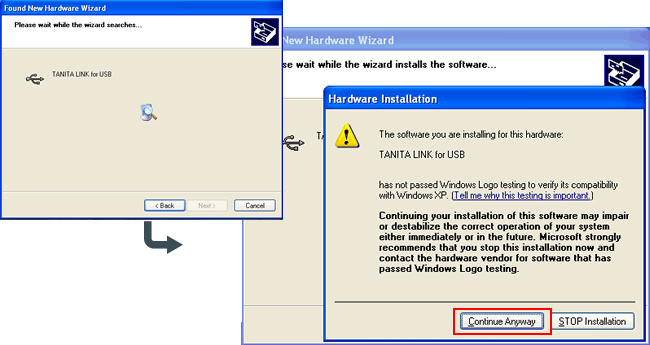
2. Hardware installation
A warning dialog box appears.
Be sure to select [Continue (C)].
Note: Please note that, if you mistakenly select [Stop installation (S)], the registration task will be terminated and normal use of Relay-Key will not be possible.
3. Registration completion
After the Search Wizard task is completed, select [Close] to close the window.
A comment is displayed in the lower right corner of the Desktop.
Note: A comment may not be displayed depending on your PC environment.
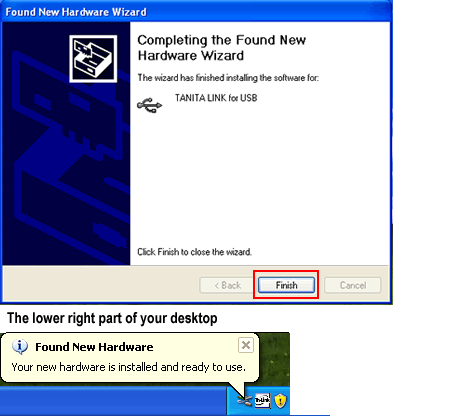
Immediately proceed on to the next step (5) without fail.

What to do next - [specifying a related file]
Though this is a rarely-seen screen, if an instruction appears to specify the file TLinkUSB.sys when executing the registration task:
If using Windows 2000 » specify C:\WINNT\system32\drivers
If using Windows XP » specify C:\WINDOWS\system32\drivers
Note: This assumes that C:\ is the hard disk drive in which the OS is installed.