Relay-Key Online Guide
 |
 |
|
 |
|
 |
|
 |
|
 |
||||||||||
 |
 |
 |
 |
 |
 |
|
 |
|
 |
 |
 |
||||||||||
(3) Installing the software
Notes: 1) This step also installs the special application and USB driver.
2) Note that the explanatory images below are those when using Windows XP.
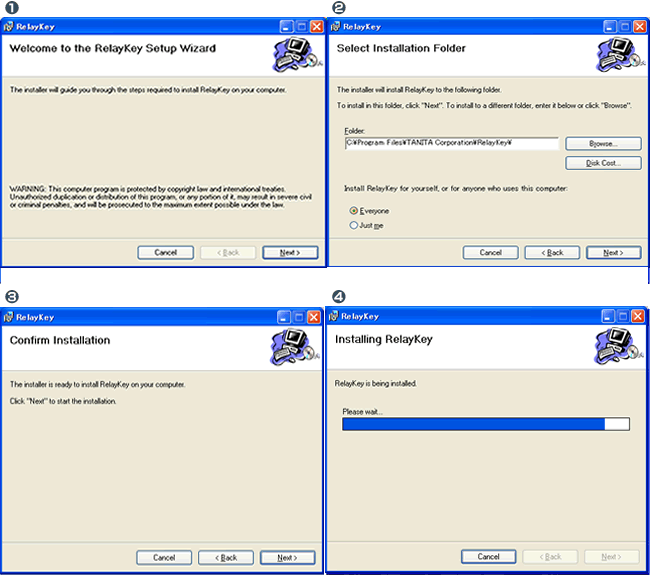
1. Installation
Execute (double click) the saved Relay-Key.msi file.
The installation screen is activated. Execute the installation as instructed on the screen.
2. Maintaining the software as a resident application
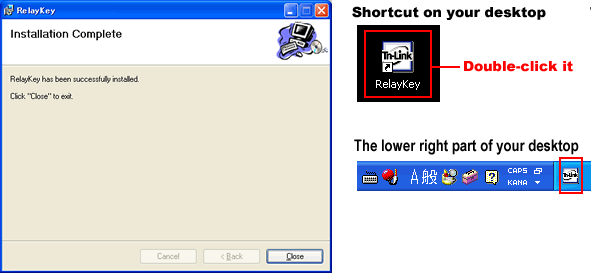
Once the installation is completed, a shortcut icon is created on the Desktop. A computer-resident icon appears (in the system tray in the lower right corner of the Desktop screen) when the created shortcut icon is executed (double-clicked).
This completes the software installation.
Note: Though it is not necessary to reboot the computer after completing the software installation, please reboot if instructed to do so due to the environment of your PC.