

Relay-Key Online Guide
 |
 |
|
 |
|
 |
|
 |
|
Relay-Key features

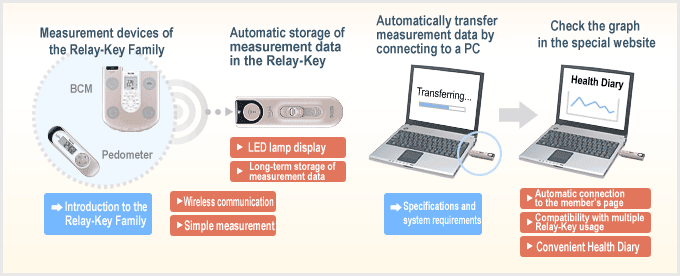
Wireless communication
Measurement by infrared communication, receipt of measurement data and so forth are possible with devices that can be used with the Relay-Key. The simple act of pressing the Relay-Key communication button makes it possible for you to access various information and do various things.

Simple measurement
Information to be set into the Relay-Key from the body composition analyzer is written into it once registration has been completed. The body composition analyzer is activated by merely aiming the Relay-Key toward it (communication section) and pressing the communication button like a TV remote control, making it possible to easily implement everything from measurement to the receipt of measurement data.
LED lamp display
The Relay-Key is not equipped with an LCD (liquid crystal) display or buzzer. Various conditions are expressed by means of red and green LED. You can confirm Relay-Key usage conditions by pressing the communication button.
For details [»» Refer to Understanding the confirmation LED]
Long-term storage of measurement data
Measurement data can be stored in the Relay-Key.
Though it depends on the usage conditions, it is generally possible to store a two-week or one-month portion of data in the Relay-Key itself.
Though the Relay-Key has been designed with a large memory capacity taking the future increase in compatible devices into account, you will probably want to implement health management on a daily basis and it is therefore recommended that you regularly connect the Relay-Key to a PC and view your Health Diary.
Note: Reference: it is possible to store measurement data generated by about 600 usages of the body composition analyzer model BC-580/BC-501.
Automatic connection to the member's page
Member registration and software installation are required and, once these have been completed, you can directly access the login screen of the member's page by simply connecting the Relay-Key to the USB port of your PC.
Since this shortcut function of course remains active even if there is no measurement data in the Relay-Key, this eliminates the need for URL entry and other bothersome tasks.
Compatibility with multiple Relay-Key usage
It is possible to register multiple Relay-Keys on your own member's page. For example, for those who feel that it is troublesome to carry it around at home or at the office...cor, from a different angle, it is possible to implement measurements and receive measurement data with devices of the Relay-Key family located at various places with a single Relay-Key.
Convenient Health Diary
Measurement data sent from the Relay-Key via your PC is stored in the special website Best Weight Style.
Measurement data is automatically displayed as a graph format and it is possible to display the graph in the Heath Graph Diary.
With the[Health Diary], it is not only possible to display a graph of the transferred data but also record simple diary memos.
Since there is a broad range of graph display categories, manual entry also makes it possible to record data that cannot be transferred by the Relay-Key.
For details [»» Refer to What is the Health Diary?]
Since the[Heath Graph Diary]is a service that can even be used by persons who do not have a Relay-Key, refer to [»» Difference between manual entry and Relay-Key entry] for the differences in functions depending on the entry method.